Diagnosis
Why is my PDF so large? Four real files, four different causes
A PDF is large because of what it carries, and the cause differs from file to file. In four public PDFs we took apart, it was full-page photos (97% of a 5.72 MB brochure), one fully embedded font (63% of a scan), accessibility tags and links (39% of a tax guide), and a file saved 4 times. Each cause has a different fix, so find yours before compressing.
- 97%of the brochure is two page-sized photos
- 442 KBof a scan is one font, used for a single line
- 62,494accessibility tags in a 142-page guide
- 4saved versions inside one brochure
“Make it smaller” advice usually starts with a compressor. That works for one kind of large PDF and does nothing, or harm, for the others. So before testing compressors we opened four public-domain PDFs and measured what their bytes are made of: a IRS Publication 17 (text), the Wrangell-St. Elias brochure (scanned artwork), a typed Ford speech scan from Gerald Ford's congressional papers, and the Kennecott Mines brochure (designed layout with photos).
Where the bytes go
A PDF is a set of numbered objects; the big ones are streams that hold images, font programs and each page's drawing instructions (ISO 32000-1, section 7.3.8). We sized every stream as it is stored in the file and grouped them:
- Images
- Embedded fonts
- Page drawing instructions
- Structure (tags, links, cross-references)
- Metadata
- Other drawings
| File | Size | Images | Fonts | Page drawing | Structure |
|---|---|---|---|---|---|
| Wrangell-St. Elias brochure | 5.72 MB | 5.54 MB | 18 KB | 60 KB | 28 KB |
| IRS Publication 17 | 2.95 MB | 59 KB | 143 KB | 1.57 MB | 1.16 MB |
| Ford speech scan | 707 KB | 248 KB | 445 KB | 4 KB | 7 KB |
| Kennecott Mines brochure | 690 KB | 422 KB | 33 KB | 35 KB | 175 KB |
Structure includes object streams (which hold the tag tree and link annotations), cross-reference data and anything stored outside a stream.
Cause 1: page-sized photos
The Wrangell-St. Elias brochure is two A2 pages, each a single 4,961 × 7,016 pixel JPEG with an invisible OCR text layer on top. The page is 1,684 points tall, and a PDF point is 1/72 inch, so 1,684 ÷ 72 = 23.4 inches; 7,016 pixels over 23.4 inches is 300 pixels per inch. At that resolution one page is 34,806,376 pixels, 99.6 MB uncompressed (3 bytes per pixel); JPEG stores it in 2.77 MB on average.
This is the case compressors are built for. Shrinking the two photos to 144 DPI with PDFnook's Shrink photos, keep text took the file from 5.72 MB to 2.55 MB (−55%), and all 11,985 characters of the OCR layer were still selectable afterwards.
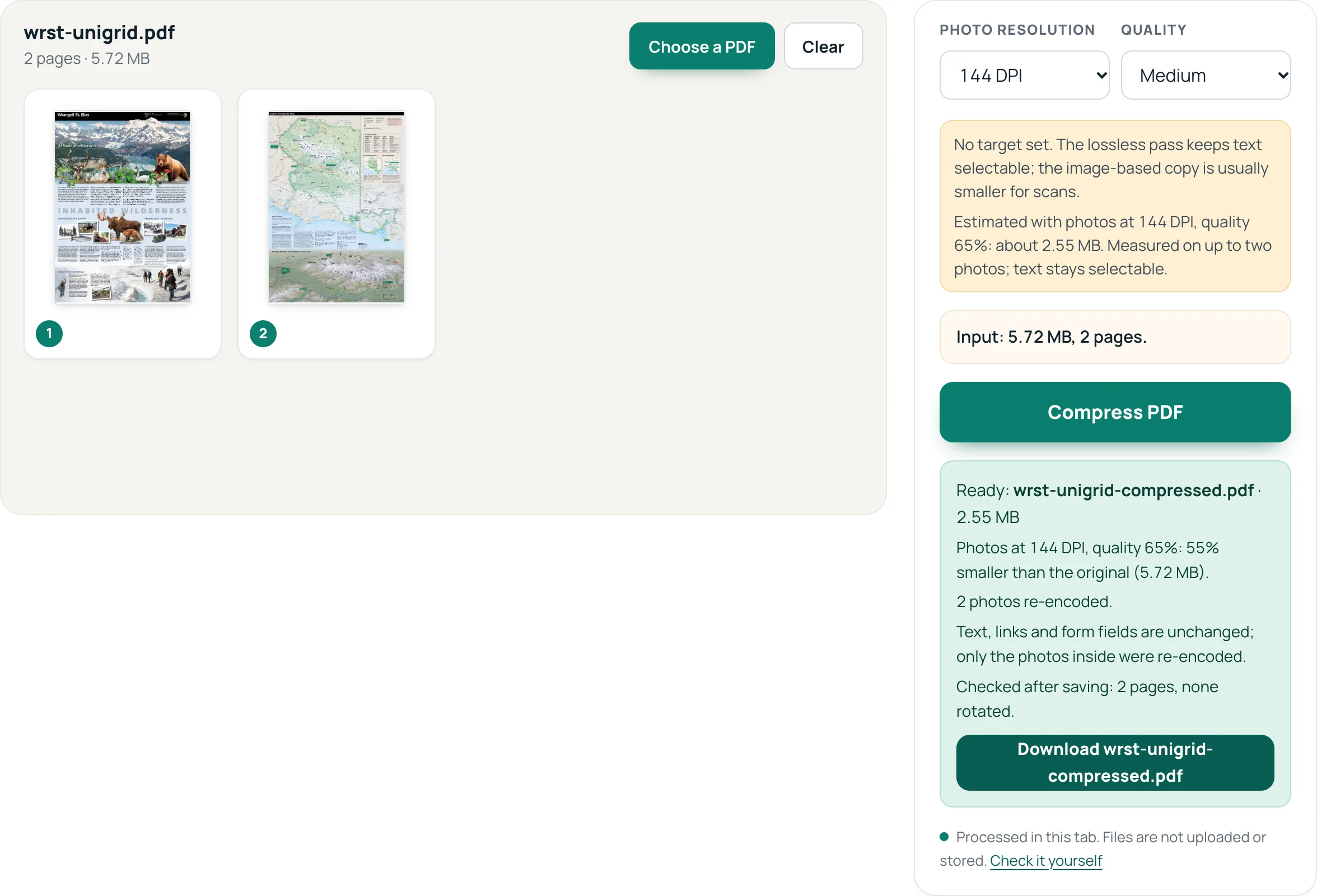
Photos at 144 DPI, quality 65%: 55% smaller than the original (5.72 MB).
Cause 2: a font embedded in full
The Ford scan is 707 KB, but the scanned page inside it is only 248 KB. Most of the rest is a single TrueType font, Arial, embedded complete: 760 KB unpacked, 442 KB compressed in the file. It draws one line, the archive's “Digitized from Box D13…” header.
PDF lets a file carry just the characters it uses; such a subset is marked by a six-letter tag before the font name, like EOODIA+Poetica (ISO 32000-1, section 9.6.4). This Arial has no tag. The other three files embed only subsets: all the fonts of the 142-page IRS guide take 143 KB.
Image compression cannot touch a font, which is why even the strongest Shrink photos setting (72 DPI, Very low) took off only 32%, while an image-based copy, which leaves the font behind, reached −91%. A tool that re-subsets fonts can: macOS's PDFKit re-save alone took it to 358 KB (−49%) in our Mac tests. PDFnook does not subset fonts today.
Cause 3: tags and links in a long document
IRS Publication 17 has no photos to speak of (one 59 KB image). Its 2.95 MB is 53% page drawing instructions for 142 pages of text and tables, and 39% structure. Inside that structure are 62,494 structure elements, the tags that let a screen reader follow headings, paragraphs and tables (ISO 32000-1, sections 14.7 and 14.8), plus 2,958 annotations such as links. They are already packed into compressed object streams (section 7.5.7).
There is nothing to “compress” here without losing something. PDFnook's lossless pass made this file +9% larger, and the tool said so and suggested keeping the original. Turning the pages into images is worse: an image-based copy at 144 DPI came to 46.7 MB, 16 times the original, with no selectable text. Stripping the tags would make the file smaller and inaccessible. The useful fixes are about pages: send only the chapter that matters (Split PDF) or delete pages nobody needs.
Cause 4: a file saved again and again
PDF editors may save changes by appending them to the end of the file, leaving the original contents in place; each save adds a new cross-reference section and trailer (ISO 32000-1, section 7.5.6). The Kennecott brochure contains 4 of these. Writing the file out once, in its current state, is lossless: PDFnook's Keep text pass did that and the brochure went from 690 KB to 613 KB (−11%) with every character and image unchanged.
How to find the cause in your own file
- Divide size by pages. 2.86 MB per page means images. 21 KB per page, as in the tax guide, means text and structure.
- Try to select text. If nothing selects, the pages are pictures (a scan or an image-only export): see reducing a scanned PDF.
- Open it in Compress PDF and set a target. The advice under the settings tells you what share of the file is JPEG photos, measured in your browser before anything runs.
- Run Keep text first. If it helps, the file had old revisions or loose structure. If it does not, the bytes are real content: photos, fonts or pages.
Questions
Why did compressing make my PDF bigger?
Because there was nothing left to remove and rewriting cost bytes: our lossless pass made the already compact IRS guide +9% larger, and an image-based copy of it was 16 times larger. PDFnook says when a result is not smaller; keep the original then.
Does compressing a PDF remove the tags that screen readers use?
PDFnook's methods do not remove them: Keep text and Shrink photos, keep text write the same objects back, and in our tests every one of the IRS guide's 794,205 characters stayed selectable. An image-based copy has no text and therefore no tags.
Can I see inside a PDF without special software?
Not in detail. The quickest checks are the ones above: size per page, whether text selects, and the photo share PDFnook reports when you set a target. For photo-heavy files, the photos to PDF guide shows what page size does to the result.
Sources
- ISO 32000-1:2008, Document management — Portable Document Format (Adobe-hosted copy) — sections cited in the text
- IRS Publication 17 (2025), Your Federal Income Tax — test file
- Wrangell-St. Elias National Park and Preserve official brochure — test file
- Gerald R. Ford, “Mr. Ford of Michigan” speech draft (Ford Congressional Papers, Box D13) — test file
- Kennecott Mines brochure, Wrangell-St. Elias National Park and Preserve — test file