PDF too large to email? How small it needs to be, and how to get there
Mail services cap messages at 20–25 MB (Gmail 25 MB, Outlook 20 MB, iCloud Mail 20 MB), and an attachment is sent base64-encoded, which makes it about 37% larger. To be safe, keep the PDF under about 17 MB for Gmail and 13 MB for a 20 MB limit. A 71.8 MB PDF of twelve camera photos came down to 4.03 MB in one run of PDFnook's Reach the target.
The limits
| Service | Limit stated by the provider | If it is larger |
|---|---|---|
| Gmail (personal) | 25 MB of attachments | Gmail replaces the attachment with a Google Drive link |
| Outlook app, internet accounts (Outlook.com, Gmail) | 20 MB | Microsoft suggests sharing a cloud link |
| Outlook app, Exchange (work) accounts | 10 MB by default; your administrator may set another value | |
| iCloud Mail | 20 MB per message | Up to 5 GB with Mail Drop, as a download link |
From the providers' help pages listed under Sources, read on 29 October 2026. The recipient's server can have a lower limit than yours.
Why a 19 MB PDF can still bounce
Email carries text, so attachments are encoded as base64: every 3 bytes become 4 characters, and lines are at most 76 characters long (RFC 2045, section 6.8), each ending in a two-character line break. The arithmetic:
size on the wire ≈ file size × 4/3 × 78/76 = file size × 1.368
Microsoft's page says its limit covers the attachment and the email together; none of the pages says whether an attachment is counted before or after encoding. If the encoded message is what counts, the largest PDF that fits is the limit divided by 1.368:
| Stated limit | Largest PDF if the encoded size counts | Comfortable target |
|---|---|---|
| 25 MB (Gmail) | 18.3 MB | 17 MB |
| 20 MB (Outlook, iCloud) | 14.6 MB | 13 MB |
| 10 MB (Exchange default) | 7.3 MB | 6 MB |
The comfortable target takes 95% of that, to leave room for the message text and headers, rounded down to a whole MB.
Test: twelve camera photos in one PDF
We put twelve NASA astronaut photographs (Nikon Z 9 and D4 originals, 71.8 MB of JPEGs) into one PDF with PDFnook's Images to PDF, on A4 pages. The PDF was 71.8 MB: the photos go in unchanged, so the PDF is the size of the photos. Far over every limit above.
On the Compress page we set a custom target of 13,000 KB, just under the 13 MB comfortable target for a 20 MB limit, and left the method on Reach the target, which tries a lossless pass, then smaller photos, then image copies, and stops at the first result that fits:
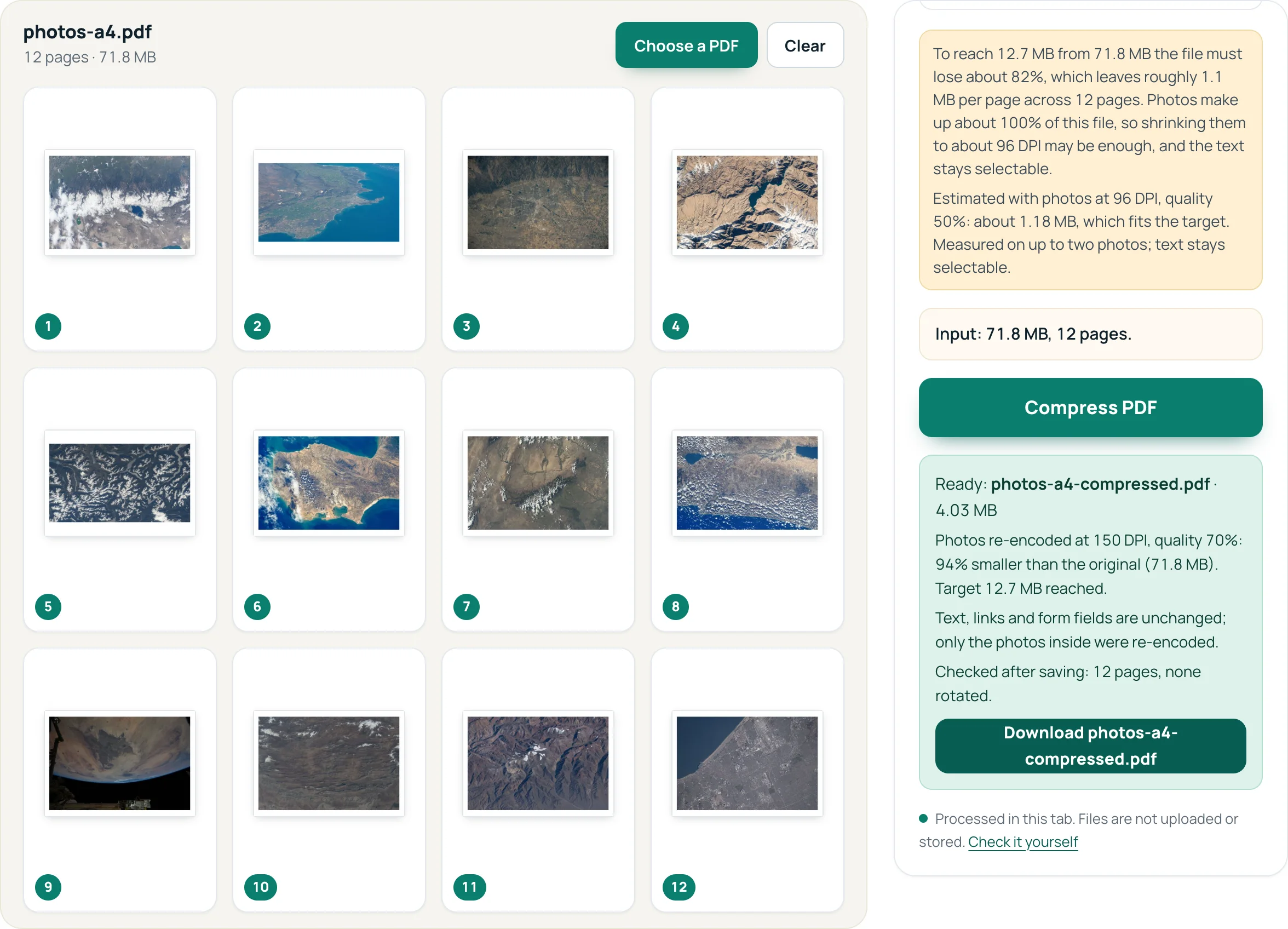
Photos re-encoded at 150 DPI, quality 70%: 94% smaller than the original (71.8 MB). Target 12.7 MB reached.
It reached 4.03 MB, far below the target. The advice box, which measures two sample photos, had estimated that about 96 DPI would fit. Reach the target then starts two steps gentler than that estimate and uses the gentlest step that measures under the target, here 150 DPI at quality 70%. If you would rather keep more detail, the fixed settings below show that 200 DPI, High also fits:
| Photo setting | PDF size | Fits 25 MB? | Fits 20 MB? | Fits 10 MB? |
|---|---|---|---|---|
| Original photos | 71.8 MB | no | no | no |
| 200 DPI, High | 8.66 MB | yes | yes | no |
| 144 DPI, Medium | 3.36 MB | yes | yes | yes |
| 96 DPI, Low | 1.17 MB | yes | yes | yes |
“Fits” counts the encoded size, the stricter reading.
Two things made this work. The pages were A4: with PDFnook's default “Fit image” page size even the strongest photo setting only reached 25.1 MB (the photos to PDF guide explains why). And the content was photos, which shrink well; a long text PDF does not.
If the PDF is mostly text
A 2.95 MB, 142-page tax guide already fits every limit, but a much longer text document might not, and compression may not save it: our lossless pass made the tax guide +9% larger (see why). For text, send fewer pages (Split PDF to send the chapter that matters, or split into parts and send several emails), or share a link as all three providers suggest.
Does zipping the PDF help?
A little. The images and most other streams in a PDF are already compressed, so a ZIP at the strongest Deflate setting saved between 3% and 13% on our four files:
| File | Zipped | Change | |
|---|---|---|---|
| IRS Publication 17 | 2.95 MB | 2.68 MB | −9% |
| Kennecott Mines brochure | 690 KB | 602 KB | −13% |
| Wrangell-St. Elias brochure | 5.72 MB | 5.44 MB | −5% |
| Ford speech scan | 707 KB | 684 KB | −3% |
That will not turn a 72 MB file into a 20 MB one, and the recipient has to unzip it.
Questions
What is the maximum PDF size for Gmail?
Gmail allows 25 MB of attachments on personal accounts. Because attachments are base64-encoded, a PDF of about 18.3 MB is the safe maximum if the encoded size is what counts.
Why does my email client say the file is too big when it is under the limit?
The message is bigger than the file: the text of the email counts too, and once encoded a 16 MB PDF is about 21.9 MB once encoded, which is over a 20 MB limit.
Is it better to compress or to send a link?
Compress when the PDF is photos or scans and the recipient needs the file itself. Send a link (Google Drive, OneDrive, Mail Drop) for long text documents or when the reader needs full quality.
Sources
- Google: Gmail attachment size limits — 25 MB for personal accounts; larger files become Drive links
- Microsoft: Reduce attachment size to send large files with Outlook — 20 MB for internet accounts, 10 MB default for Exchange
- Apple: Mailbox size and message sending limits in iCloud — 20 MB per message, up to 5 GB with Mail Drop
- Apple: Mail Drop limits
- RFC 2045, MIME Part One, section 6.8 (Base64 Content-Transfer-Encoding) — 3 bytes become 4 characters; lines of at most 76 characters
- NASA Images and Media Usage Guidelines
- IRS Publication 17 (2025), Your Federal Income Tax — test file